
Camera Password Corrupted - Power Surge Knocks off NVR

proxybox

Young grasshopper
Feb 8, 2015
40
3
Los Angeles
I've had my system work flawlessly for over 10 years. 4 IP Hikvision IP cameras powered via POE through a Hikvision NVR. On Monday, we had a weird power surge that knocked the cameras offline and everything came back except one camera.

Camera: DS-2cd2232-i5.
NVR: DS-7808N-E2/8P

I was successful at accessing the camera separately via a powered POE switch and logging in. Through the camera gui I can Live view and configure settings. I factory defaulted it and get the activation pw screen. I disconnect it and connect it back to my NVR so it can handle the handshake but it keeps on giving me Offline (user password error). I have the setup to plug n play. I also clicked that camera and then clicked activate, clicked use admin password and then ok. Still nothing. I also tried manually entering the NVR password into the camera and it still won't accept it.

Thanks!
 

Attachments
  • nvr-cam2.JPG
    nvr-cam2.JPG
    55.8 KB · Views: 4
Last edited:
I was successful at accessing the camera separately via a powered POE switch and logging in. Through the camera gui I can Live view and configure settings. I factory defaulted it and get the activation pw screen. I disconnect it and connect it back to my NVR so it can handle the handshake but it keeps on giving me Offline (user password error). I have the setup to plug n play. I also clicked that camera and then clicked activate, clicked use admin password and then ok. Still nothing. I also tried manually entering the NVR password into the camera and it still won't accept it.
The camera should have been automatically activated by the NVR after you reset the camera to defaults.
Odd that it didn't, when the channel is set to Plug&Play.
But you can still add the camera manually.

If the admin password that you activated the camera with is the same as the one the NVR is configured to use for the camera, that's good so far.
Now you need to change the camera IP address to match the address the NVR is expecting to find the camera on via the NVR PoE port.
Inspect this in the NVR web GUI under Camera Management, it will be something like 192.168.254.x
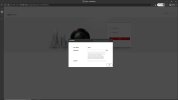
Your screenshot shows the camera IP address is back at the LAN default value of 192.168.1.64.
Power the camera separately, access the web GUI, and set the IP address to the one the NVR is expecting.
Re-connect the camera to the NVR PoE port.
Hopefully it will reconnect.
 
This is exactly why all NVR's should be plugged into a Backup UPS to prevent such problems.

Have you restarted the NVR to see if that helps with the wayward cam.
absolutely agree. My entire network is battery backup but with the nvr just never got around to it. I even have room for it on my rack lol. At any rate, something happened to channel 1 and it won't auto negotiate with the camera. Yes, definitely rebooted and also cold booted from power off to see if that would make a difference but no go.
 
The camera should have been automatically activated by the NVR after you reset the camera to defaults.
Odd that it didn't, when the channel is set to Plug&Play.
But you can still add the camera manually.

If the admin password that you activated the camera with is the same as the one the NVR is configured to use for the camera, that's good so far.
Now you need to change the camera IP address to match the address the NVR is expecting to find the camera on via the NVR PoE port.
Inspect this in the NVR web GUI under Camera Management, it will be something like 192.168.254.x
Your screenshot shows the camera IP address is back at the LAN default value of 192.168.1.64.
Power the camera separately, access the web GUI, and set the IP address to the one the NVR is expecting.
Re-connect the camera to the NVR PoE port.
Hopefully it will reconnect.
The camera default 1.64 is when I login to the camera directly via a separate POE switch. Once in I can control it, view live cam, etc. Its when I default it to factory settings and connect to the NVR that issues come up. So when it goes to the NVR it shows the 168.254.2 ip. I'll try manually setting everything like you suggest. I haven't set IP etc only nvr username and password.
 
The camera should have been automatically activated by the NVR after you reset the camera to defaults.
Odd that it didn't, when the channel is set to Plug&Play.
But you can still add the camera manually.

If the admin password that you activated the camera with is the same as the one the NVR is configured to use for the camera, that's good so far.
Now you need to change the camera IP address to match the address the NVR is expecting to find the camera on via the NVR PoE port.
Inspect this in the NVR web GUI under Camera Management, it will be something like 192.168.254.x
Your screenshot shows the camera IP address is back at the LAN default value of 192.168.1.64.
Power the camera separately, access the web GUI, and set the IP address to the one the NVR is expecting.
Re-connect the camera to the NVR PoE port.
Hopefully it will reconnect.
wtf!!! You're a genius.. It worked. When I hard coded the IP 254.2 and put the password of the NVR manually on the web gui of the camera, disconnected it and attach it to the NVR it shows up. I'm not sure why the plug n play didn't work but its fixed. I was dreaded having to factory reset the NVR and start from scratch so this fix will do until I replace these old cameras and NVR one day. Thank you so much!!!