IPC-Color4K-T and IPC-Color4K-T180 230227 Firmware

I noticed that Dahua has a firmware update (2026-05-08) for this camera IPC-Color4K-T80 (IPC-PDW5849-A180-E2-ASTE) on their site. I installed it on one of my two T180's, and it seems to be working well. Possibly IVS detection from the sides is better with this update. (fingers crossed)
Here is a quick test after updating my camera. Link to the firmware: IPC-PDW5849-A180-E2-ASTE

That would be awesome
 
Mine has been working ok. It was a refurb from Andy. Although the temptation to get some new feature or improvement is great, I don't think I will change what's not broken at this point.
 
Mine has been working ok. It was a refurb from Andy. Although the temptation to get some new feature or improvement is great, I don't think I will change what's not broken at this point.
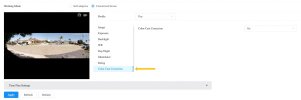
That is probably wise, but since I have multiple T180 cameras, I don't mind testing the firmware on one camera to see if it makes an improvement. I don't recall if this was included in the previous firmware, but the color cast correction on this firmware works very well at night.
 

Attachments

  • color cast.jpeg
    color cast.jpeg
    120.3 KB · Views: 32
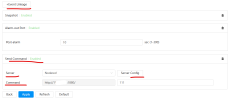
Hi everyone, does anyone know the requirements for the Event Linkage - Server feature on the IPC-Color4K-T180? Just got the camera yesterday and I'm trying to configure it. Is it sending an HTTP POST, GET, or something else entirely? Thanks in advance if anyone has a clue!
1780625543500.png
 

Attachments

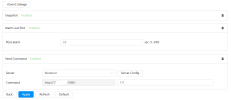
  • 1780625506618.png
    1780625506618.png
    21.2 KB · Views: 4
@AlexA It sends an HTTP GET to the server in the bottom-left box with the URL specified in the bottom-right box (where you have "111"). For example, you can use it to trigger Blue Iris directly by entering:
admin?camera=CamShortName&trigger=1&zones=1

It would be just like copying the contents of those two boxes and pasting them (one after the other) into your web browser's address bar, and then pressing [Enter].
 
@AlexA It sends an HTTP GET to the server in the bottom-left box with the URL specified in the bottom-right box (where you have "111"). For example, you can use it to trigger Blue Iris directly by entering:
admin?camera=CamShortName&trigger=1&zones=1

It would be just like copying the contents of those two boxes and pasting them (one after the other) into your web browser's address bar, and then pressing [Enter].
Thanks! Appreciated!
 
Hi everyone,

I'm hitting a weird behavior on a IPC-Color4K-T180 camera. I am using the "Send Command" linkage inside an IVS Tripwire rule to send an HTTP GET request to a local Node-RED instance.

The manual "Test" button triggers a network connection, and hitting the URL via a browser works perfectly, but a live human walk-by transmits absolutely zero network packets to Node-RED.

The Setup:

  • Camera: IPC-Color4K-T180 System Version3.140.0000000.62.R Build Date:2026-01-14
  • Node-RED Host: 10.x.x.x:1880/ (Path: dahua?camera=Front&alert=tripwire1)

The Diagnostic Data:

The Browser Test: If I type the full URL () directly into a web browser, Node-RED receives the trigger and fires the flow perfectly. The Node-RED HTTP input path is verified working.
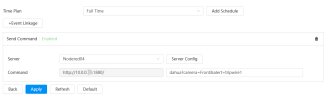
1780757801438.png
The "Test" Button: Connects every time. However, tcpdump on the gateway shows the TCP handshake completes successfully, but the packet has length 0 (no data payload is actually being sent past the handshake).

1780757812739.png
Live Walk-by: Synology Surveillance Station successfully records a live IVS/Tripwire event. The camera's AI engine is definitely tracking and firing.
During a live walk-by, a continuous tcpdump on the gateway shows completely zero packets leaving the camera for port 1880. The IPC-Color4K-T180 camera never even attempts a handshake on a IVS/Tripwire event .

Verified Settings:

  • Synology Surveillance Station successfully records a live IVS/Tripwire event.
  • IVS: "Send Command" checkbox is explicitly enabled for this tripwire rule.
  • Schedule: Linkage arming schedule is solid green (24/7).
  • URL Syntax: IP field contains only the raw IP address; port and paths are separate.
Has anyone seen this specific behavior, or is there a hidden trick to saving settings on recent firmware that I might be missing? Thanks!