IPC-Color4K-T and IPC-Color4K-T180 230227 Firmware

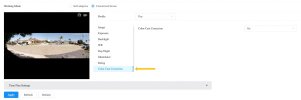
I noticed that Dahua has a firmware update (2026-05-08) for this camera IPC-Color4K-T80 (IPC-PDW5849-A180-E2-ASTE) on their site. I installed it on one of my two T180's, and it seems to be working well. Possibly IVS detection from the sides is better with this update. (fingers crossed)
Here is a quick test after updating my camera. Link to the firmware: IPC-PDW5849-A180-E2-ASTE

That would be awesome
 
Mine has been working ok. It was a refurb from Andy. Although the temptation to get some new feature or improvement is great, I don't think I will change what's not broken at this point.
 
Mine has been working ok. It was a refurb from Andy. Although the temptation to get some new feature or improvement is great, I don't think I will change what's not broken at this point.
That is probably wise, but since I have multiple T180 cameras, I don't mind testing the firmware on one camera to see if it makes an improvement. I don't recall if this was included in the previous firmware, but the color cast correction on this firmware works very well at night.
 

Attachments

  • color cast.jpeg
    color cast.jpeg
    120.3 KB · Views: 34
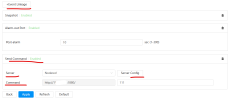
Hi everyone, does anyone know the requirements for the Event Linkage - Server feature on the IPC-Color4K-T180? Just got the camera yesterday and I'm trying to configure it. Is it sending an HTTP POST, GET, or something else entirely? Thanks in advance if anyone has a clue!
1780625543500.png
 

Attachments

  • 1780625506618.png
    1780625506618.png
    21.2 KB · Views: 4
@AlexA It sends an HTTP GET to the server in the bottom-left box with the URL specified in the bottom-right box (where you have "111"). For example, you can use it to trigger Blue Iris directly by entering:
admin?camera=CamShortName&trigger=1&zones=1

It would be just like copying the contents of those two boxes and pasting them (one after the other) into your web browser's address bar, and then pressing [Enter].
 
@AlexA It sends an HTTP GET to the server in the bottom-left box with the URL specified in the bottom-right box (where you have "111"). For example, you can use it to trigger Blue Iris directly by entering:
admin?camera=CamShortName&trigger=1&zones=1

It would be just like copying the contents of those two boxes and pasting them (one after the other) into your web browser's address bar, and then pressing [Enter].
Thanks! Appreciated!
 
Hi everyone,

I'm hitting a weird behavior on a IPC-Color4K-T180 camera. I am using the "Send Command" linkage inside an IVS Tripwire rule to send an HTTP GET request to a local Node-RED instance.

The manual "Test" button triggers a network connection, and hitting the URL via a browser works perfectly, but a live human walk-by transmits absolutely zero network packets to Node-RED.

The Setup:

  • Camera: IPC-Color4K-T180 System Version3.140.0000000.62.R Build Date:2026-01-14
  • Node-RED Host: 10.x.x.x:1880/ (Path: dahua?camera=Front&alert=tripwire1)

The Diagnostic Data:

The Browser Test: If I type the full URL () directly into a web browser, Node-RED receives the trigger and fires the flow perfectly. The Node-RED HTTP input path is verified working.
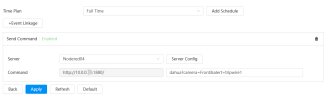
1780757801438.png
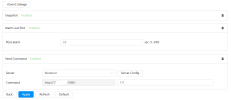
The "Test" Button: Connects every time. However, tcpdump on the gateway shows the TCP handshake completes successfully, but the packet has length 0 (no data payload is actually being sent past the handshake).

1780757812739.png
Live Walk-by: Synology Surveillance Station successfully records a live IVS/Tripwire event. The camera's AI engine is definitely tracking and firing.
During a live walk-by, a continuous tcpdump on the gateway shows completely zero packets leaving the camera for port 1880. The IPC-Color4K-T180 camera never even attempts a handshake on a IVS/Tripwire event .

Verified Settings:

  • Synology Surveillance Station successfully records a live IVS/Tripwire event.
  • IVS: "Send Command" checkbox is explicitly enabled for this tripwire rule.
  • Schedule: Linkage arming schedule is solid green (24/7).
  • URL Syntax: IP field contains only the raw IP address; port and paths are separate.
Has anyone seen this specific behavior, or is there a hidden trick to saving settings on recent firmware that I might be missing? Thanks!

 
@Techie007L – Quick question for you, since Empiretecandy/Andy is being completely unhelpful with this issue (they actually asked for remote SSH access to my local machine and wanted to install a special tool on my computer, which is a hard pass for me).

What firmware version are you currently running on your camera? And to confirm, are your live IVS triggers actually successfully firing the server HTTP GET command on your end?

Knowing your firmware version and if your live triggers actually hit the server will help me isolate the issue. Thanks!
 
@AlexA I find that ONVIF polling is typically delayed by several seconds and occasionally misses events, so I switched to HTTP commands instead of ONVIF polling to inform Blue Iris of IVS triggers on all my IPC-Color4M-TL cameras. I've disabled Get ONVIF trigger events for each of these cameras in Blue Iris, and they're all reliably recording just fine via this HTTP command method, running firmware Hugo_V3.120.0000000.34.R.260306. I have an IPC-Color4K-T that I could switch from ONVIF polling to HTTP command triggering, but I don't have any IPC-Color4K-T180 cameras to test with. Although what you pictured above is exactly what the UI looks like on both the IPC-Color4M-TL and IPC-Color4K-T cameras. Also note that the HTTP header generated by these cameras is slightly malformed (everything is lowercase and lacking spaces), which could be a problem for some recipients.