Hi everyone,
I'm hitting a weird behavior on a IPC-Color4K-T180 camera. I am using the
"Send Command" linkage inside an IVS Tripwire rule to send an HTTP GET request to a local Node-RED instance.
The manual
"Test" button triggers a network connection, and hitting the URL via a browser works perfectly, but a
live human walk-by transmits absolutely zero network packets to Node-RED.
The Setup:
- Camera: IPC-Color4K-T180 System Version3.140.0000000.62.R Build Date:2026-01-14
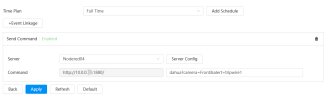
- Node-RED Host: 10.x.x.x:1880/ (Path: dahua?camera=Front&alert=tripwire1)
The Diagnostic Data:
The Browser Test: If I type the full URL (
) directly into a web browser,
Node-RED receives the trigger and fires the flow perfectly. The Node-RED HTTP input path is verified working.
 The "Test" Button:
 Connects every time. However, tcpdump on the gateway shows the TCP handshake completes successfully, but the packet has length 0 (no data payload is actually being sent past the handshake).
 Live Walk-by: Synology Surveillance Station successfully records a live IVS/Tripwire event.
 The camera's AI engine is definitely tracking and firing.
During a live walk-by, a continuous tcpdump on the gateway shows
completely zero packets leaving the camera for port 1880. The IPC-Color4K-T180 camera never even attempts a handshake on a IVS/Tripwire event .
Verified Settings:
- Synology Surveillance Station successfully records a live IVS/Tripwire event.
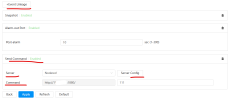
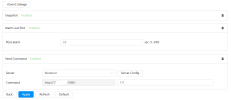
- IVS: "Send Command" checkbox is explicitly enabled for this tripwire rule.
- Schedule: Linkage arming schedule is solid green (24/7).
- URL Syntax: IP field contains only the raw IP address; port and paths are separate.
Has anyone seen this specific behavior, or is there a hidden trick to saving settings on recent firmware that I might be missing? Thanks!