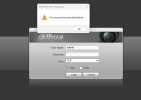
The account has been blacklisted.

Jan 27, 2026
11
9
Earth
This is what appears when I try to log into a DVR interface. I traveled to a location to install a new camera (I swapped between two different cameras before realizing the cable was the issue as to why neither were lighting up, I don't know if that would trigger anything), I did not get into the interface much, if at all, I had someone assisting me at the home office who said they could see the interface of the ip cam itself and said they would import/configure the rest while I moved onto the next dvr at a different location. They had said they tried to login once and this was the error message they received on the very first login attempt and that it hadn't shown any login attempts remaining. They stated that they talked with the person on site and had them reboot this dvr but it's still giving this error message. I do not currently have physical access to this dvr. I can call and attempt to walk someone who doesn't know much about technology about through what to do if I can figure out what I need to do, but I'm not sure how to resolve the error as is. How would I go about clearing this error or resetting the amount of tries needed? As shown, this is for the admin account.
1779890385846.png
 
  • Wow
Reactions: mat200
Maybe the DVR have IP filter on that only allow local access to it? Your help was trying remote access to the DVR and not allowed.
 
  • Like
Reactions: bigredfish
If that's the case, then that setting would have been turned on later. We have always been able to access it remotely up until that point.
 
If Caused by entering bad password too many times, wait for it to expire. Usually default in 30-60 minutes

If it’s IP blacklisted it won’t clear, try access from another network

If you’re port forwarding it will get hacked quickly
 
The lockout hasn't expired. If it is IP blacklisted, how would that have happened, and is there no other way to access it other than putting it on a separate network?
 
No, changing the NVR network won’t change/help anything if is an IP lockout.

The IP of the device trying to access the NVR is theoretically blacklisted by the NVR.

You would need to access the NVR from a different network than what you were on when you got the error warning
 
  • Like
Reactions: JDreaming
What’s concerning to it says “the account” is blacklisted

It may have already been hacked

I would unplug it from the Internet, give it time, say 60 minutes, and try to login via the console, direct machine interface with a mouse and monitor connected to it

If you can’t do that physically , have someone turn it OFF at the power button and turn it back on.

Can you access the login screen after that?
 
Last edited:
I just had him turn off the DVR, I'm going to call him back in 60 minutes. What shall I have him do? He can log in locally and view all the menus (system, camera, etc.) already. Is there something I can have him do to unlock/unblock him/us? I don't think he's using the admin account, I think he has a different account, but the way it's setup, the account that he's using has similar administrative privileges (the people who set this up initially weren't very particular about which permissions to give/take away in a lot of instances, so it's likely they just used whatever the defaults for a new account were when setting it up).
 
Assuming your IP that you are using to remote in from is blacklisted

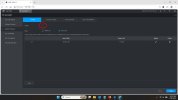
Have him go to this screen and TURN OFF/DISABLE this function.
blacklist.jpg


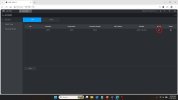
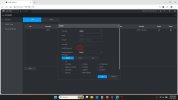
Then have him go to Accounts and make sure 1) the admin user exist, if so 2) use the pencil icon to open the dialog box and change the admin password (both of you write it down)

Then REBOOT

account1.jpg account2.jpg


Honestly, if you are port forwarding your router to allow remote access, its a waste of time as you'll be hacked shortly anyway
 
I figured out the issue. Somehow, IP filtering had been turned on (this is an older dvr with an older interface, I had to dig one out of storage and poke around the settings menu for one that sounded suspect and IP filtering definitely fit the bill). I had the user disable the option and I was able to login to the DVR successfully. Thank you for your assistance.