
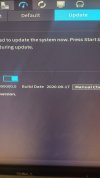
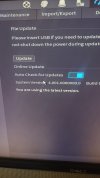
Compatibility issues with my Dahua NVR (DHI-NVR5216-16P-I Firmware V4.001.0000000.0, Build Date: 2020-06-17) and attached Cameras
- Thread starter Longview
- Start date
You are using an out of date browser. It may not display this or other websites correctly.
You should upgrade or use an alternative browser.
You should upgrade or use an alternative browser.


bigredfish
Known around here
So the NVR just woke up one day and decided not to allow access to the cameras?
What else happened? I'm guessing a network related change...
Can you see the cameras LIVE when logged into the NVR on the LIVE tab? (Not the IE button)
Can you log into the NVR via its Web GUI? Typically by default at 192.168.1.108
What else happened? I'm guessing a network related change...
Can you see the cameras LIVE when logged into the NVR on the LIVE tab? (Not the IE button)
Can you log into the NVR via its Web GUI? Typically by default at 192.168.1.108
Last edited:

Mark_M
Known around here
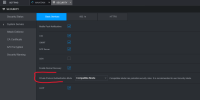
Login to the NVR, go to Security and turn Private protocol Authentication mode to 'Compatible mode'.
Test if the cameras connect.
The latest update to this NVR (pictured) is V4.002.0000000.4.R, Build Date: 2024-07-25 .
This takes away all of the 2020 firmware 'covid' thermal camera detection stuff.
Use Dahua support website version tool update. support
If this doesn't work, send me a PM and I'll send you a copy of the firmware.
Test if the cameras connect.
The latest update to this NVR (pictured) is V4.002.0000000.4.R, Build Date: 2024-07-25 .
This takes away all of the 2020 firmware 'covid' thermal camera detection stuff.
Use Dahua support website version tool update. support
If this doesn't work, send me a PM and I'll send you a copy of the firmware.
Can you see the cameras LIVE when logged into the NVR on the LIVE tab? (Not the IE button), Yes I can see them Live.
Can you log into the NVR via its Web GUI? Yes Login is successful but my NVR address is different.
Can you log into the NVR via its Web GUI? Yes Login is successful but my NVR address is different.
I have the software but told it may not work unless it is an OEM Device which it is. I went to download from the Dahua site and it can not validate the Serial Number?
Got it from Andy three years ago, I guess I will try the Firmware and see if it works or not?
Got it from Andy three years ago, I guess I will try the Firmware and see if it works or not?
Nick70068
Pulling my weight
I have a NVR5208-8p-4KS2 purchased from EmpireTech Andy, and when I enter my serial number into the "ahua support website version tool update." it says "SN does not exist".
I contacted Dahua on two separate times for support, and both times they told me that this NVR isn't a Dahua product.
I contacted Dahua on two separate times for support, and both times they told me that this NVR isn't a Dahua product.

The tech that installed my camera set my WIFI address to DHCP and it was changing the login IP. I can log into the NVR and Cameras locally.
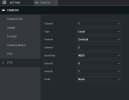
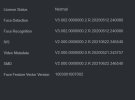
The NVR is a Dahua DHI-NVR5216-16P-I with Firmware DH_NVR5XXX-I_MultiLang_V4.002.0000000.4.R.240725, and the Camera a PTZ5A4K-25X, I can log into the camera and move it around but the NVR does not control the PTZ or do any Auto Tracking as that is what I wanted the camera for? I am hoping it is an incorrect setting so the NVR can do it and I don't have to set it up on the Camera. I created a preset on the camera but when it boots it goes to the left limit and stops. Should I try running Auto Tracking only on the Camera?
The NVR is a Dahua DHI-NVR5216-16P-I with Firmware DH_NVR5XXX-I_MultiLang_V4.002.0000000.4.R.240725, and the Camera a PTZ5A4K-25X, I can log into the camera and move it around but the NVR does not control the PTZ or do any Auto Tracking as that is what I wanted the camera for? I am hoping it is an incorrect setting so the NVR can do it and I don't have to set it up on the Camera. I created a preset on the camera but when it boots it goes to the left limit and stops. Should I try running Auto Tracking only on the Camera?
Attachments
bigredfish
Known around here
Presets and Auto tracking should be set on the camera UI itself not on the NVR..
This goes for ANY setting on ANY Dahua camera/NVR setup.
Or better: Use SmartPSS Lite to Live view/Playback/Download and control your PTZ manually if you need to for some reason
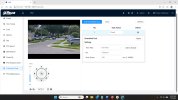
On the PTZ tab of your Camera GUI
Establish a "Home" Preset
1- Set a preset #1
2- Under"Power up: set it to Preset and Preset #1
3- Under "Schedule Task" - add a Task, Action=Preset
-Tell it Schedule (Full time likely)
-Tell it what # Preset- Preset #1 likely
-Tell it how long to linger on last activity before returning Home (You want this to be at least a few seconds longer than your tracking time
NEXT and Only AFTER the above is complete, do you setup rules for Auto Tracking on the "AI" tab
Choose Preset #1 and setup IVS rule(s) for that Preset.
Tracking Target Size Ratio determines zoom. Careful not to make it too high on close target zones or will wil fail to gtrack. Start at 30-35
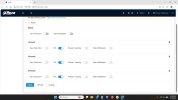
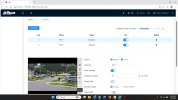
This goes for ANY setting on ANY Dahua camera/NVR setup.
Or better: Use SmartPSS Lite to Live view/Playback/Download and control your PTZ manually if you need to for some reason
On the PTZ tab of your Camera GUI
Establish a "Home" Preset
1- Set a preset #1
2- Under"Power up: set it to Preset and Preset #1
3- Under "Schedule Task" - add a Task, Action=Preset
-Tell it Schedule (Full time likely)
-Tell it what # Preset- Preset #1 likely
-Tell it how long to linger on last activity before returning Home (You want this to be at least a few seconds longer than your tracking time
NEXT and Only AFTER the above is complete, do you setup rules for Auto Tracking on the "AI" tab
Choose Preset #1 and setup IVS rule(s) for that Preset.
Tracking Target Size Ratio determines zoom. Careful not to make it too high on close target zones or will wil fail to gtrack. Start at 30-35
Big Red Fish You are a great teacher. Thanks for the excellent advice. I will apply the remedies you suggest and report results or failure.
bigredfish
Known around here
Basically your life will be better and simpler if you only set things on the NVR that are related to recording schedules and networking.
USe SmartPSS Lite for daily Live View/Playback/Downloading clips. Much easier and better experience than the NVR interface generally.
When you want to make changes to Image/Exposure/NR etc, IVS, Sound, etc do it directly on the camera.
My rule of thumb is if it can be done on the camera GUI, then do it there.
Master Recording and networking and a few other things are done on the NVR and generally over-rule the camera settings (Though your camera profiles schedule (Day/Night), IVS rule schedule, and/or recording on an SD card are done on the camera)
People get into trouble when the make some changes/settings on the camera and the same setting on the NVR. Things dont always synch.
Best to do it on the camera, hit Save and Refresh, which pushes settings back to the NVR
USe SmartPSS Lite for daily Live View/Playback/Downloading clips. Much easier and better experience than the NVR interface generally.
When you want to make changes to Image/Exposure/NR etc, IVS, Sound, etc do it directly on the camera.
My rule of thumb is if it can be done on the camera GUI, then do it there.
Master Recording and networking and a few other things are done on the NVR and generally over-rule the camera settings (Though your camera profiles schedule (Day/Night), IVS rule schedule, and/or recording on an SD card are done on the camera)
People get into trouble when the make some changes/settings on the camera and the same setting on the NVR. Things dont always synch.
Best to do it on the camera, hit Save and Refresh, which pushes settings back to the NVR
bigredfish
Known around here
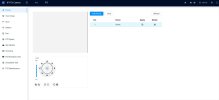
When logging into the PTZ camera with NVR, I have no view from the Camera, should I use SMART PSS to set it up?
No. You'll get the same thing if you login to the camera GUI via SmartPSS.
You have a browser/plugin compatibility issue
Use IE or Edge in IE mode.
You should be able to use plain edge if:
First go to the folder on your computer called Program Files- "webrec/torch, and from the most recent folder there delete a file called websocketserver23450
When you login to the camera, dont allow the plugin to install, say No. Also if a warning box pops up at login asking to allow VideoWebServer say NO