BI 6 not using Nvidia Card

mvoss

Getting the hang of it
Oct 21, 2023
112
89
Texas
I'm sure this has been explained before but I can't find it.

I just upgrded to BI 6.0.8.5 from 5.x. The AI on 6 seems to be working fine but it will not fire using my Nvidia Card, RTX3050. It will only work w/ the internal UHD Graphics 770.

Am I do something wrong, or do you fine folks need more information. Could it be my Nvidia Drivers? These drivers worked with BI 5 and CPAI.

I am using Yolo26s at the moment but I get the same results on Yolo8 and Yolo 10.

Thank you,

Michael
 
  • Like
Reactions: Flintstone61
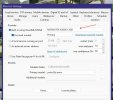
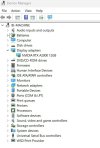
Is it listed here and selected? I doubt its your drivers. I assume the card shows up in your device manager as well?

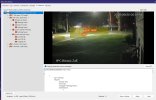
Screenshot 2026-06-29 212641.jpg Screenshot 2026-06-29 212901.jpg
 
  • Like
Reactions: JDreaming
@Tinman, I apologize I wasn't very clear. BI sees the card but it will sometimes miss AI notifications and when it does pick it up it's slower than the built in UHD card.

For instance the UHD card will alert in 74ms while the Nvidia is 350ms. I've been testing it w/ same camera, lighting, etc. The Nvidia card will sometimes report a error 1460, which I believe is a timeout error.

Never happened on CPAI.

Just curious if I'm missing something. The only other issue, I'm working through, is some static images.

Other than that, you were right BI 6.0 install was flawless.

Thanks again,

Michael
 
I have my on onboard UHD video disabled in the cmos. Something don't sound right.
 
I'm going to try some tinkering, and see if my Intel 630 UHD Graphics chip is any quicker at AI than my Nvidia RTX 3060ti.
I'm not sure which value being displayed in AI inspector is the one we are shooting for....
I may have my system hosed up with defaults that check for too many objects.
Of course now the traffic has died down....so it will be awhile.....before i get a car going thru the frames.
 
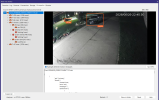
When I went to BI6 I uninstalled codeproject and any folder associated with it. I also uninstalled all the Cuda NVidia files completely and now just run the Nvidia driver and Nvidia desktop manager...period. No more cuda install programs. Everything runs fine. I am surprised your onboard video would out perform your NVidia RTX 3060.

Screenshot 2026-06-30 103058.jpg

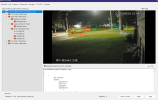
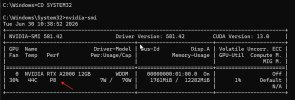
I also use to run a bat file to control my Nvidia card performance. Here is a great video explaining that. I now just run my card at its default P8 performance as it is all I really need.

Screenshot 2026-06-30 104407.jpg

 
Last edited:
  • Like
Reactions: Flintstone61
Thank you both. I'll look at this evening as I agree this doesn't make sense.

I'll keep everyone updated in case others run into this.

Thank you so much!

Michael
 
When I went to BI6 I uninstalled codeproject and any folder associated with it. I also uninstalled all the Cuda NVidia files completely and now just run the Nvidia driver and Nvidia desktop manager...period. No more cuda install programs. Everything runs fine. I am surprised your onboard video would out perform your NVidia RTX 3060.

View attachment 245706

I also use to run a bat file to control my Nvidia card performance. Here is a great video explaining that. I now just run my card at its default P8 performance as it is all I really need.

View attachment 245707

I'm copying you on the codeproject uninstall and folder removal.
 
Hi Guys,

I am having the same issue and came looking for answers.

I have come across a problem where is BlueIris is sending AI inference to the wrong GPU for real alerts, but not while using testing and tuning.
I have a Intel UHD and an NVIDIA card, when I select the NVIDIA card and use testing and tuning it work fine ~20ms, but a real event can take many seconds, UHD slammed at 100% usage.
when I select UHD, testing and tuning is very slow with full Intel usage, but leave it and a real event works fine with only a little usage in the NVIDIA and none on the UHD.

Glad I'm not the only one experiencing this.

I get by for now just choosing UHD, but it can get annoying when testing, having to change the selected card constantly.

BlueIris 6.0.9.5 running as service
NVIDIA RTX4070Ti
Intel i7-14700k
inbuilt AI using Yolov26x - it happens no matter what model is selected.
 
I just did some more comprehensive file/folder/process exclusions in Virus&Threat Protection settings. Seeing how i changed some drive letters around. Hoping my millisecond time might improve.
Update: My CPU %age isn't spiking as much as it was during multiple motions events with and without cameras AI.
 
Last edited: