1/1.2" 8MP Varifocal

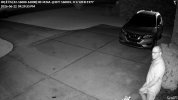
I did some digging to interpret what the debug data at the top of the images mean. This is what I found:

HQ: Indicates that the camera is currently using its High Quality stream profile
E: Stands for Enhanced Video Encoding

CS:[32-16000-16000]:00: Represents the Camera-to-Server connection stats.
32: The minimum required stream bitrate.
16000: The target encoding bitrate.
16000: The maximum allowable bitrate cap configured in the Protect settings
:00: An internal system status code indicator

M:NA: Stands for Motion Adaptive Bitrate. In setups where it is enabled, the camera dynamically drops or scales up the bitrate depending on how much movement is happening in the scene. The "NA" means it is not actively fluctuating or is currently fixed to your maximum streaming profile

@30: Displays your active framerate setting of 30 Frames Per Second (FPS).
T: 16000: The Target Bitrate that the camera is actively attempting to transmit back to your UniFi console or Network Video Recorder (NVR)
L: 0: Typically reflects a placeholder or benchmark indicator for internal packet Latency or dropped frames. A score of 0 is ideal, indicating no latency issues.
1/120: The current Shutter Exposure Speed. This means the sensor is letting in light for 1/120th of a second per frame.
R:1977: Represents the Recorded Bitrate. This is the exact number of actual bits per second being packaged and received by the NVR.

I believe that bitrate may be something that needs looking into. Why is it recording at that if I have it set to the Maximum of 16000.
Also, from what I've gathered, I can tell the camera to not include certain zones in its interpretation of exposure needed for the scene. It looks like I can include that bush in a zone to ignore.
Also, it looks like I can turn on an Enhanced bitrate zone to force a higher bitrate in certain areas.
G6 Pro Turret 6-22-2026, 9.29.55pm CDT.jpg
 
  • Like
Reactions: JDreaming
The only reason I bought the two for comparing, is I want the best combo for usability and image quality. The price is just a range I'm comfortable with spending up to. I don't want to go to the extreme ranges of some systems, even though those may be better quality and more user friendly. I'm really enjoying the Protect system. If I can get the cameras to operate to be able to identify persons/vehicles at all hours over a multitude of scenes, I'll go the Unifi route most probably due to the Protect system. That may mean adding Dahua cameras with AI ports. The pricing is a range. Anything from the low part of that range to the high (unifi) end is acceptable to me.
So, can you tell us exactly how you made g6 pro to produce better night videos of moving objects?
Have you added any aditional lights?
And how to add that diagnostic info the the video?
 
So, can you tell us exactly how you made g6 pro to produce better night videos of moving objects?
Have you added any aditional lights?
And how to add that diagnostic info the the video?
Looks fine up-close, still skeptical about motion in distances further away
 
So, can you tell us exactly how you made g6 pro to produce better night videos of moving objects?
Have you added any aditional lights?
And how to add that diagnostic info the the video?
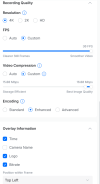
I noticed the most difference when I zoomed in to where the bush directly below it was not in the image. I believe it was overexposing the scene. I moved the FPS to 30. I also have it set to frame clarity mode. I bumped the video compression to custom and moved it as far up as possible. The overlay is in recording settings as well if you check Bitrate.
1782400343869.png
 
  • Like
Reactions: JDreaming and Arjun
I noticed the most difference when I zoomed in to where the bush directly below it was not in the image. I believe it was overexposing the scene. I moved the FPS to 30. I also have it set to frame clarity mode. I bumped the video compression to custom and moved it as far up as possible. The overlay is in recording settings as well if you check Bitrate.
Are you seeing any ghosting after all those changes?
 
  • Like
Reactions: JDreaming
So what's the update with the nighttime performance on the G6 Pro Turret? Did you end up returning it?
 
So what's the update with the nighttime performance on the G6 Pro Turret? Did you end up returning it?
Below was their response after the last changes were made. I won't return it because I do like the better daytime identification distance. But, I am not happy with the nighttime performance. I am still searching for a camera that can equal the daytime performance of the G6 Pro and the nighttime performance of the T54IR.

Hi,

Thank you for your patience while we reviewed this with the development team.

The team has completed their analysis and confirmed that some motion blur is still expected when subjects move quickly through the scene at night. This is a normal characteristic of security cameras operating in low-light conditions, where the camera must balance exposure time, image brightness, and image noise.

Compared to the previous video, the latest footage shows a noticeable improvement. The updated tuning reduces sensor gain and shortens exposure time, which helps reduce ghosting and improve motion clarity. As a result, facial details, subject definition, and overall image quality are improved in the newer recording.

To better compare the results, could you please try zooming in on the subject in both images at a similar point in the scene? When viewed more closely, the improvements in subject definition and facial detail are easier to see.

The development team also advised that further reducing motion artifacts would likely require even shorter exposure times or lower gain, which would make the image darker and introduce additional noise in low-light conditions. The current settings are intended to provide the best overall balance between motion clarity, image brightness, and noise performance.

Please let me know your observations after comparing the images more closely, and I'll be happy to continue the discussion.

Best,

Dexter
 
  • Like
Reactions: Arjun
Below was their response after the last changes were made. I won't return it because I do like the better daytime identification distance. But, I am not happy with the nighttime performance. I am still searching for a camera that can equal the daytime performance of the G6 Pro and the nighttime performance of the T54IR.
you really think the DayTime G6 captures were better?
 
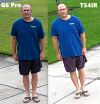
But at the same time, there is nothing that distinguishes you from one versus the other - I still can't make out any logos on shoes or clothing or what the logo is on your shirt.

In other words, if you were in front of the police, could they ID you from either picture, and I would say the answer is yes?

It may look better, but doesn't provide enough detail in a person standing still to make a difference, and would probably be even less difference with an object in motion.
 
But at the same time, there is nothing that distinguishes you from one versus the other - I still can't make out any logos on shoes or clothing or what the logo is on your shirt.

In other words, if you were in front of the police, could they ID you from either picture, and I would say the answer is yes?

It may look better, but doesn't provide enough detail in a person standing still to make a difference, and would probably be even less difference with an object in motion.
At that distance, there is a noticeable difference. The further the distance, the more noticeable it becomes.
 
Below was their response after the last changes were made. I won't return it because I do like the better daytime identification distance. But, I am not happy with the nighttime performance. I am still searching for a camera that can equal the daytime performance of the G6 Pro and the nighttime performance of the T54IR.
That's because you're comparing a 4K camera with a 2K camera. A camera that substantially outperforms the G6 Pro already exists: EmpireTech IPC-Color4K-T, and it costs half as much.
 
At that distance, there is a noticeable difference. The further the distance, the more noticeable it becomes.

It is a noticeable difference....is it noticeable enough that one image could be used by the police and the other one can't (I don't think so)...is it worth double the price?

If you could read the logo on one and not the other, then maybe the argument holds more ground.

Plus it is a digital zoom, so the further the distance, the more digital zoom needed, which would make the image fall apart even faster.

If I am concerned about a further distance, then I will get a camera optically zoomed to that pinchpoint.

If it works for you and all your activity is in the daytime, that is awesome. Most of mine is at night, so I want a camera that performs best then.
 
It is a noticeable difference....is it noticeable enough that one image could be used by the police and the other one can't (I don't think so)...is it worth double the price?

If you could read the logo on one and not the other, then maybe the argument holds more ground.

Plus it is a digital zoom, so the further the distance, the more digital zoom needed, which would make the image fall apart even faster.

If I am concerned about a further distance, then I will get a camera optically zoomed to that pinchpoint.

If it works for you and all your activity is in the daytime, that is awesome. Most of mine is at night, so I want a camera that performs best then.
I took the images at that distance to see where the T54IR started falling off. Past that point, the subject becomes less identifiable on both cameras, but the T54IR fails to identify first. If I optically zoom in, the FOV decreases, so the area I'm able to identify people in shrinks. This is just due to one being 4K and the other 2K. The point is, the G6 Pro can identify subjects in a larger FOV at greater distances in the daytime. At night, the T54IR wins. I need a combination of both for my scenarios. Pricing isn't my determining factor up to a point. The G6Pro is at the top of the sliding pricing scale I'm looking at. I'm not saying the G6 Pro is better than the T54IR. It's definitely not. It's just for my scenes I'm looking to cover, I need daytime identification at a wide FOV and a wide range of distance as much as, if not more than I need nighttime identification. The G6 Pro handles the daytime performance I need, but not the nighttime. The T54IR handles the nighttime performance I need, but not the daytime. If the T58IR was good at night, that is what i would go with.

But, then there's the Protect system I like as well. I need something, execs can pull up and look at nice little thumbnails on their iPhones and play footage.
 
  • Like
Reactions: Arjun
I took the images at that distance to see where the T54IR started falling off. Past that point, the subject becomes less identifiable on both cameras, but the T54IR fails to identify first. If I optically zoom in, the FOV decreases, so the area I'm able to identify people in shrinks. This is just due to one being 4K and the other 2K. The point is, the G6 Pro can identify subjects in a larger FOV at greater distances in the daytime. At night, the T54IR wins. I need a combination of both for my scenarios. Pricing isn't my determining factor up to a point. The G6Pro is at the top of the sliding pricing scale I'm looking at. I'm not saying the G6 Pro is better than the T54IR. It's definitely not. It's just for my scenes I'm looking to cover, I need daytime identification at a wide FOV and a wide range of distance as much as, if not more than I need nighttime identification. The G6 Pro handles the daytime performance I need, but not the nighttime. The T54IR handles the nighttime performance I need, but not the daytime. If the T58IR was good at night, that is what i would go with.

But, then there's the Protect system I like as well. I need something, execs can pull up and look at nice little thumbnails on their iPhones and play footage.
I would just keep both at this point and mount them side by side, reap the benefits of both, one for daytime and other for night-time. Ubiquiti has a reputable track record of NOT listening to their customers anyway. They want us to follow their way. One of the most annoying aspects the company fails to acknowledge is that after every software / firmware update the alarm manager breaks and has to be configured from scratch (restoring from backup does not consistently remedy this issue).

 
I would just keep both at this point and mount them side by side, reap the benefits of both, one for daytime and other for night-time. Ubiquiti has a reputable track record of NOT listening to their customers anyway. They want us to follow their way. One of the most annoying aspects the company fails to acknowledge is that after every software / firmware update the alarm manager breaks and has to be configured from scratch (restoring from backup does not consistently remedy this issue).

That's my dilemma. I have to get a bunch of cameras. The 2 I have are just for testing before I buy a bunch to install at my work. I was hoping to get one brand of these. I have all Dahua there now. I haven't experienced the breaking of alarm manager yet, but I've only gone through one update on software and one on firmware. I have been really pleased with the ease of use of Protect as well as the ease of setup of their cameras (not having to go through multiple interfaces). I want a 8MP camera that is good at night in a system that is very user friendly. That doesn't seem to exist in a sub $500 camera.
 
  • Like
Reactions: JDreaming and Arjun
That's my dilemma. I have to get a bunch of cameras. The 2 I have are just for testing before I buy a bunch to install at my work. I was hoping to get one brand of these. I have all Dahua there now. I haven't experienced the breaking of alarm manager yet, but I've only gone through one update on software and one on firmware. I have been really pleased with the ease of use of Protect as well as the ease of setup of their cameras (not having to go through multiple interfaces). I want a 8MP camera that is good at night in a system that is very user friendly. That doesn't seem to exist in a sub $500 camera.
You always can try to add more light or IR to make G6 pro image quality acceptable at night time.
The only problem is that with added illumination, Dahua cameras going to look even better :)